
AI Features
Generate boards, images, narrations, videos, and original music with AI.
Corkulous uses AI to help you create boards faster. Describe what you want and generate a board, or work item by item: ask the Agent to add content, generate images, create spoken audio and videos, and compose original music.
Note: AI can make mistakes and may return errors. Review generated boards, media, research, and Agent responses before relying on them.
Data sent to providers: AI can send your prompt, included board/conversation content, attachments, and enabled tool requests to external services. Those services may retain inputs, outputs, and technical records under their applicable policies and API terms. Review the provider privacy and data-use links before sharing sensitive information. Deleting content in Corkulous does not automatically erase copies held by those services.
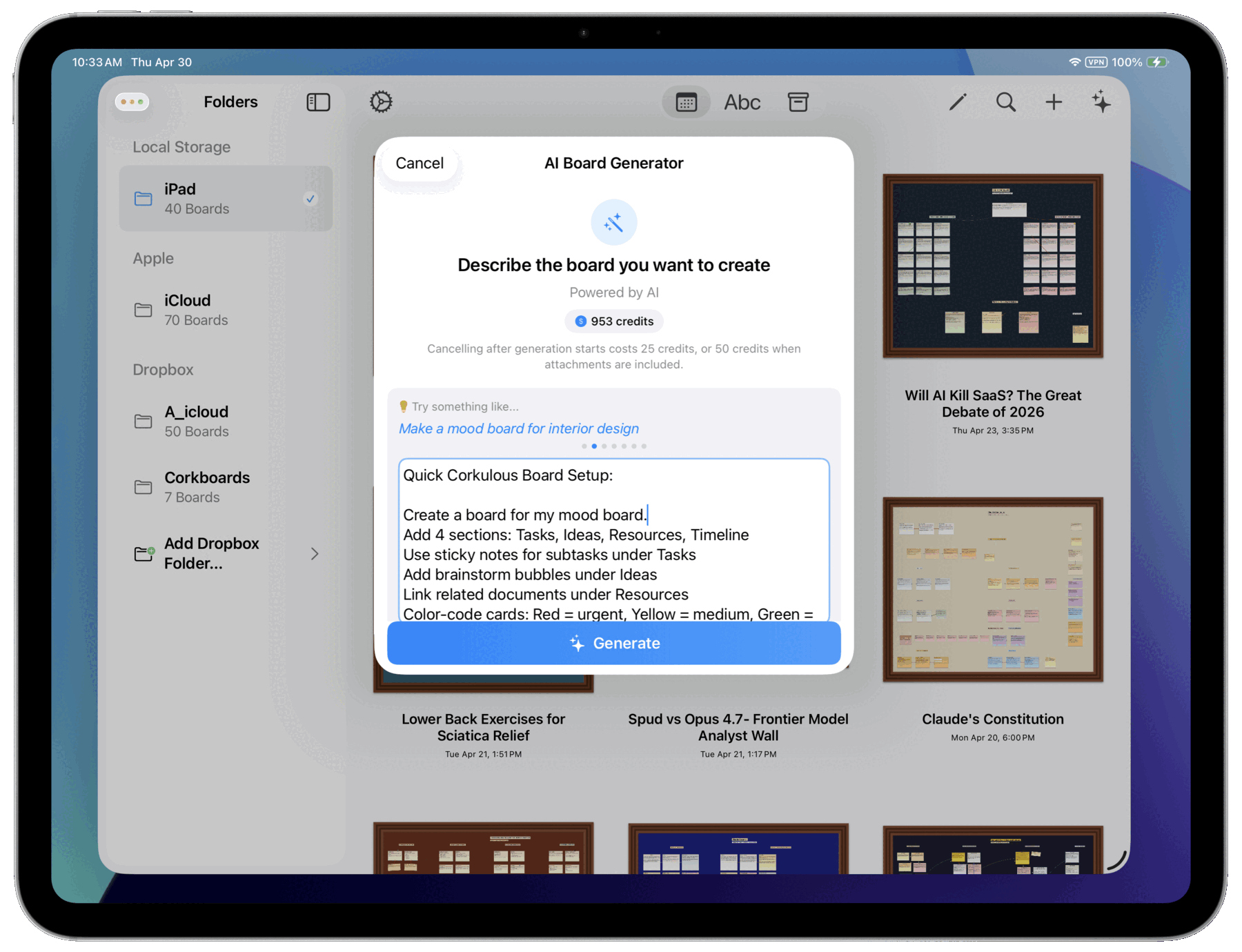
What AI Can Do
- Generate Boards: Describe what you want, and AI creates a complete board with cards, notes, labels, shapes, and connections.
- Agent: Use natural-language requests to add items, reorganize content, or get suggestions.
- Create Images: Generate custom AI images and add them directly to your board.
- Generate Audio Narration: Create spoken narrations from text.
- Generate Music: Create original songs, beats, and instrumental tracks in Credits mode and Provider Mode.
- Generate Videos: Create AI-generated videos and add them to your boards (Provider Mode).
- Web Research: AI can search the web to include current information in your boards.
Two Ways to Access AI
Corkulous offers two ways to use AI features:
- Credits System: The simplest option. Sign in with email, purchase credits, and start using AI immediately without managing API keys. Corkulous handles temporary holds, final settlement, and provider routing for you.
- Provider Mode (your own API keys): For power users who want more control. Available on Mac and on iPhone and iPad running iOS or iPadOS 26 or later. Use your own API keys from providers like OpenAI, Anthropic, Google, xAI, and ElevenLabs.
Most users will find the Credits System the easiest way to get started.
Credits vs Provider Mode
| Feature | Credits | Provider Mode |
|---|---|---|
| Board generation | Yes | Yes |
| Agent | Yes | Yes |
| Image generation | Yes | Yes |
| Audio narration | Yes | Yes |
| Music generation | Yes | Yes (requires ElevenLabs setup) |
| Video generation | No | Yes |
| Setup required | Email sign-in | API keys |
| Availability | iPhone, iPad, Mac | Mac; iPhone and iPad on iOS or iPadOS 26 or later |
A few Provider Mode specifics:
- Music: Requires an ElevenLabs API key and ElevenLabs music model. For the Agent and board generation, the Music tool must also be enabled.
- Video: Currently requires Google or xAI. OpenAI still works well for text, image, audio, and web search workflows.
- Defaults: Media-capable provider cards include a Defaults section. Those saved defaults are shared across image, audio, music, and video generation views, and across AI orchestration. Generation views open with the saved defaults for the selected provider, while the Agent and board generation snapshot the current defaults when a run starts.
Why Provider Mode Needs iOS or iPadOS 26
Provider Mode is available on Mac and on iPhone and iPad running iOS or iPadOS 26 or later. Earlier iOS and iPadOS versions use Credits mode.
Provider Mode can fan out into many planner and worker jobs, tool calls, and long-running network requests. On iOS and iPadOS 26, long board generations can keep running in the background when the system allows it. That time isn’t guaranteed, so keep Corkulous open until long runs finish.
Music from the Mac CLI
The Mac CLI supports music generation using its own provider configuration. CLI keys and defaults are separate from the main app’s Provider Mode settings. You can generate music from the command line and have the resulting tracks added to your board automatically.
CLI music requires an ElevenLabs API key and is controlled by the workers.maxMusicWorkers setting (0 disables music workers). See Command Line Tool and AI Music Generation for setup details.
Next Steps
- Generate a Board with AI
- Prompting Best Practices
- Prompt Architect Guide
- Agent
- AI Audio Generation
- AI Music Generation
- Credits System
Privacy and Charges
AI can receive relevant board contents and conversation context as well as the prompt you type. Enabled tools can contact search providers and websites. Review the Privacy Policy and Credits guide before sharing sensitive information or starting a larger workflow. Provider Mode and CLI usage are billed by your providers separately from Corkulous Credits.
