
Agent
AI Features /AgentUse the Agent to add items, generate media, and refine your board.
The Agent works directly on your open board. Ask for what you want in plain language, and it adds cards, notes, images, audio narration, video, and music for you. It works in both Credits and Provider Mode, with different tool availability.
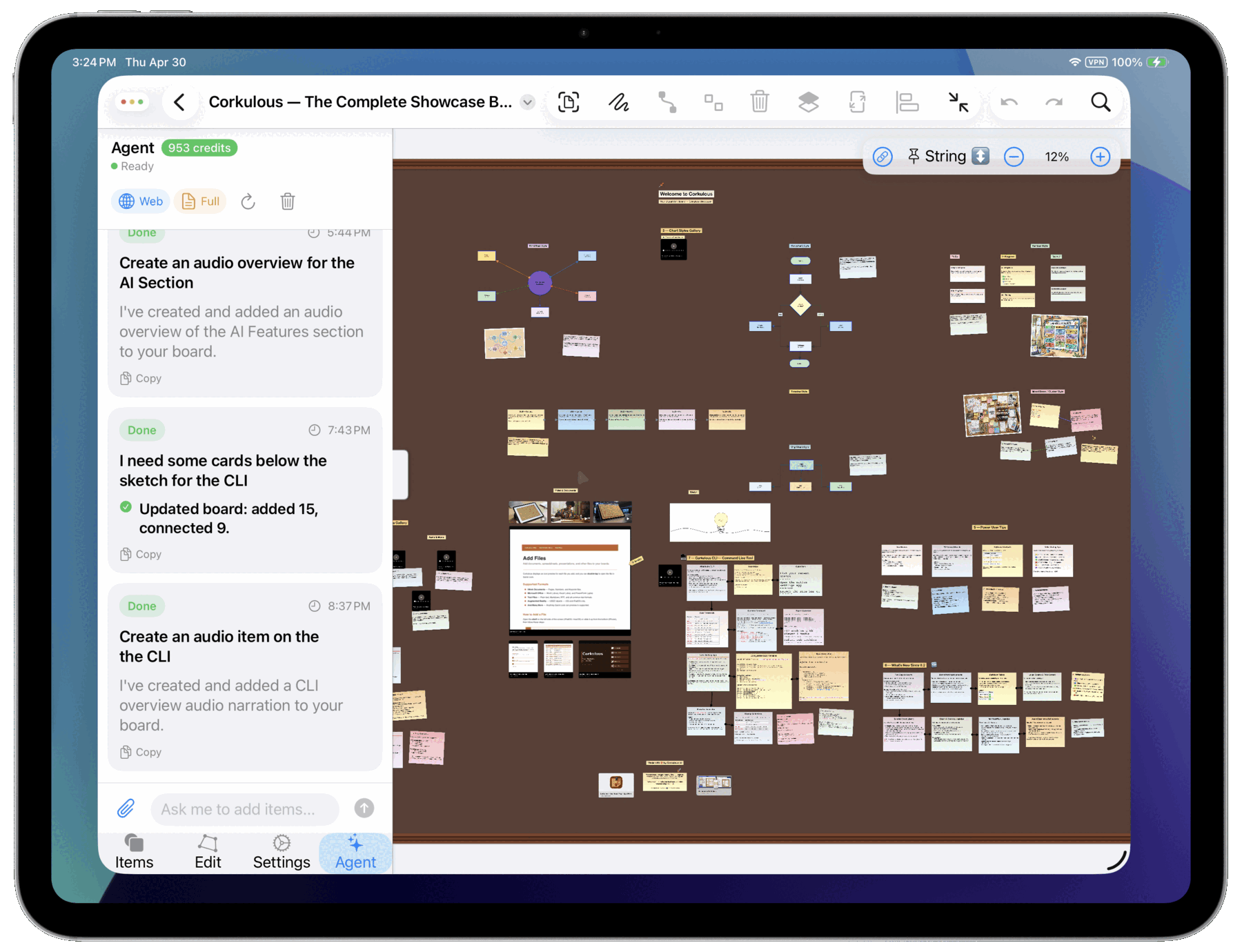
Using the Agent
- Open Your Board: Navigate to the board you want to work with.
- Tap the Agent Button: Look for the sparkles button labeled Agent in the toolbar.
- Type Your Request: Tell AI what you want to add or change.
- Review Changes: AI adds items directly to your board.
What You Can Ask
- Add Items: “Add a card about marketing strategy”
- Create Multiple Items: “Add three notes with pros and cons of remote work”
- Add Links: “Add a link to the Apple website”
- Search for Images: “Find photos of mountain landscapes and add them”
- Generate Images: “Create an image of a team meeting and add it”
- Create Audio Narration: “Generate an audio summary of this board”
- Create Music: “Create a 30-second lo-fi track for this board”
- Research Topics: “Add current statistics about electric vehicles”
- Use Your Files: “Turn the attached meeting notes into cards for decisions, owners, and deadlines”
Attachments
Give the Agent a file to work from. Tap the paperclip button next to the message field, choose one or more files, then type your request. Attached files appear above the message field with their size; tap the x on a file to remove it before sending.
Supported files: PDF, PNG, JPEG, WebP, plain text, Markdown (.md), CSV, and JSON.
| Limit | Credits | Provider Mode |
|---|---|---|
| Files per message | Up to 8 | Up to 10 |
| Size per file | Up to 20 MB | Up to 20 MB |
| Total size per message | Up to 40 MB | Provider limits apply |
| PDF length | Up to 100 pages | Provider limits apply |
- Attachments are sent with the next message only. If a later request needs the same file, attach it again.
- The paperclip is unavailable while the Agent is responding, and in Credits mode until you sign in.
- In Credits mode, requests to generate an image, narration, or music can’t use attachments yet. Remove the attachments and send the request again, or use Provider Mode.
- Attachments are sent to the AI provider along with your message. In Credits mode, large documents can raise the cost of a request. See Credits.
Audio vs Music in the Agent
Use clear wording so AI picks the right tool:
| If you want | Ask with terms like |
|---|---|
| Spoken narration | “audio narration”, “read this aloud”, “voiceover”, “text to speech” |
| Songs or tracks | “music”, “song”, “beat”, “ditty”, “instrumental” |
Tip: Include duration and style in the same prompt, for example: “Create a 30-second instrumental ambient track.”
Two Ways to Use the Agent
Credits Mode
The simplest way to use the Agent. Sign in with email, buy credits, and Corkulous handles the provider side for you.
| Tool | What It Does |
|---|---|
| Add Items | Cards, notes, stickies, labels, links |
| Image Generation | Create AI images and add them to your board |
| Audio Generation | Generate spoken narrations from text |
| Music Generation | Generate songs, beats, and instrumentals |
| Web Research | Search the web for current information |
Best for: Most users who want AI features without any configuration.
Provider Mode
More control and additional capabilities on Mac and on iPhone and iPad running iOS or iPadOS 26 or later. You provide your own API keys from providers like OpenAI, Anthropic, Google, xAI, or ElevenLabs.
| Tool | What It Does |
|---|---|
| Add Items | Cards, notes, stickies, labels, links |
| Image Generation | Create AI images (choose your provider) |
| Audio Generation | Generate spoken narrations (multiple voice options) |
| Music Generation | Generate songs, beats, and instrumentals (with ElevenLabs setup) |
| Video Generation | Create AI videos and add them to your board |
| Web Research | Search the web for current information |
| Model Choice | Select which AI models to use |
Best for: Power users who want more control, model choice, and advanced media generation.
Comparing the Modes
| Feature | Credits | Provider Mode |
|---|---|---|
| Setup Required | Email sign-in | Configure API keys |
| Add Board Items | Yes | Yes |
| Image Generation | Yes | Yes |
| Audio Narration | Yes | Yes |
| Music Generation | Yes | Yes (requires ElevenLabs setup) |
| Video Generation | No | Yes |
| Choose AI Models | No | Yes |
| Cost | Purchase credits | Pay providers directly |
| Availability | iPhone, iPad, Mac | Mac; iPhone and iPad on iOS or iPadOS 26 or later |
In Provider Mode, music through the Agent requires:
- ElevenLabs API key
- ElevenLabs selected as the music provider/model
- Music tool enabled in AI settings
Tips
- Be conversational. The Agent keeps recent turns in context.
- Ask follow-up questions or request changes.
- Include desired duration for music (for example, “30 seconds”).
- You can undo any AI additions with Edit → Undo.
- AI places new items automatically, but you can move them after.
